Dual Camera PiP - DualView: Record two perspectives on Android
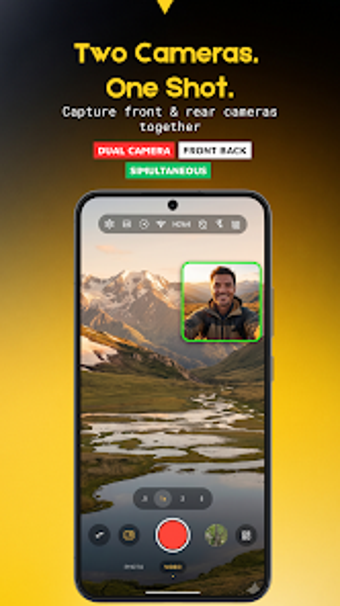
You open your phone, frame yourself and the scene, and capture both angles at once with Dual Camera PiP - DualView by ssolstice. The app records from front and rear lenses simultaneously and offers live preview plus multiple layouts to compose shots across PiP, split, and side-by-side views. It also exposes professional manual controls, export bitrate and frame-rate options, and AF/AE locks. You are the target if you make vlogs, interviews, or social clips needing paired viewpoints.

Unlock your creativity with Adobe Stock
Get 10 images or 1 video with a free trial
DualView converts a single device into a two-angle recorder
You use the app to shoot from both cameras at once, capturing video and stills in a single session. DualView presents an adjustable Picture-in-Picture window and alternative layouts so you can position a second view while you record. Layout choices include:
- PiP with drag and pinch-to-resize
- Vertical split and horizontal split
- Side-by-side framing
Expect hardware-dependent compatibility and controlled export settings
The app requires hardware support for multi-camera streams and Camera2 API access, which affects whether dual capture is available on your device. It uses native camera APIs for lower latency and supports high-definition export with adjustable bitrate and frame-rate controls. The real-time preview helps verify capture before recording, and the developer notes smooth performance on supported hardware rather than universal behavior across all models.
A creator-focused interface offers manual depth but asks for familiarity
The interface keeps distractions low and exposes professional controls such as ISO, shutter speed, white balance, and AF/AE lock so you can tune exposure and focus. The developer is known for camera utilities, and this app ranks among niche photography tools for creators. You get a lightweight workflow that suits vloggers, travelers, and interviewers, though the manual controls require some prior familiarity to exploit fully.
A practical gateway for creators willing to experiment with paired perspectives
DualView is a practical entry point for creators curious about recording from two viewpoints; it rewards experimentation and careful setup but asks that you accept a technical dependency on device capability and a modest learning curve for its manual controls. Choose it if you want a focused shooting tool that emphasizes creative framing over feature overload, and expect results to reflect your level of experimentation and camera knowledge.